Six tools cover the 2026 mechanical engineering workflow: Neural Concept for physics prediction from geometry, Leo AI for CAD knowledge retrieval, Autodesk Fusion for generative design, ANSYS Discovery for real-time simulation, Siemens NX with Teamcenter for enterprise lifecycle management, and CoLab for automated design review.
Key takeaways
Geometric deep learning trained on prior CFD and FEA results predicts 3D physics performance directly from geometry.
Orbital Stack cut urban wind-comfort iteration from 10 hours to 2 minutes, close to a 300x speedup.
That same case reports roughly one tenth the cost per iteration, which is what makes the speedup actionable.
Engineering intelligence differs from productivity AI: it is judged on physical accuracy, not on fluency.
Table of contents
Key takeaways:
Six tools cover the 2026 mechanical engineering workflow: Neural Concept for physics prediction from geometry, Leo AI for CAD knowledge retrieval, Autodesk Fusion for generative design, ANSYS Discovery for real-time simulation, Siemens NX with Teamcenter for enterprise PLM, and CoLab for automated design review.
Geometric deep learning trained on prior CFD and FEA results predicts 3D physics performance directly from geometry. Orbital Stack (RWDI Ventures) cut urban wind-comfort iteration from 10 hours to 2 minutes with Neural Concept, close to a 300× speedup, at one tenth the cost per iteration.
Program compression drives the investment: vehicle programs that once ran 48-60 months now target 18-24 months, with no matching growth in engineering headcount.
Integration depth is the strongest predictor of return. A serviceable tool reads native B-rep and mesh formats and connects to Teamcenter, Windchill, or 3DEXPERIENCE, which removes the export-upload-import cycle that erodes time on task within a quarter.
Reported gains span the toolchain: Autodesk cites generative design parts up to 40% lighter and 20% stronger, and AI-driven solvers return FEA and CFD results 10 to 100 times faster than conventional runs.
This guide covers the three pressures behind AI investment in 2026, the three selection criteria that separate a serviceable tool from a demo, and the six best AI tools for mechanical engineers.
This guide is for mechanical engineers and engineering managers who want to see where AI can make a difference in the product development cycle.
From the initial concept to handoff to manufacturing, each of the tools we look at in this article plays a role. Applications include ideation, detailed CAD (Computer-Aided Design) modeling, simulation, design review, and Product Lifecycle Management (PLM).
AI acts as a helpful layer throughout the process. It helps engineers retrieve previously stored work and understand the design intent behind it, so they can make new decisions without having to start over.
For mechanical engineers, the practical question is whether the AI can read actual design files. That sets the scope of this article: tools that extract design intent and prior work out of CAD geometry, simulation outputs, and PLM records.
Review of the top 6 AI tools for mechanical engineers in 2026
1. Neural Concept
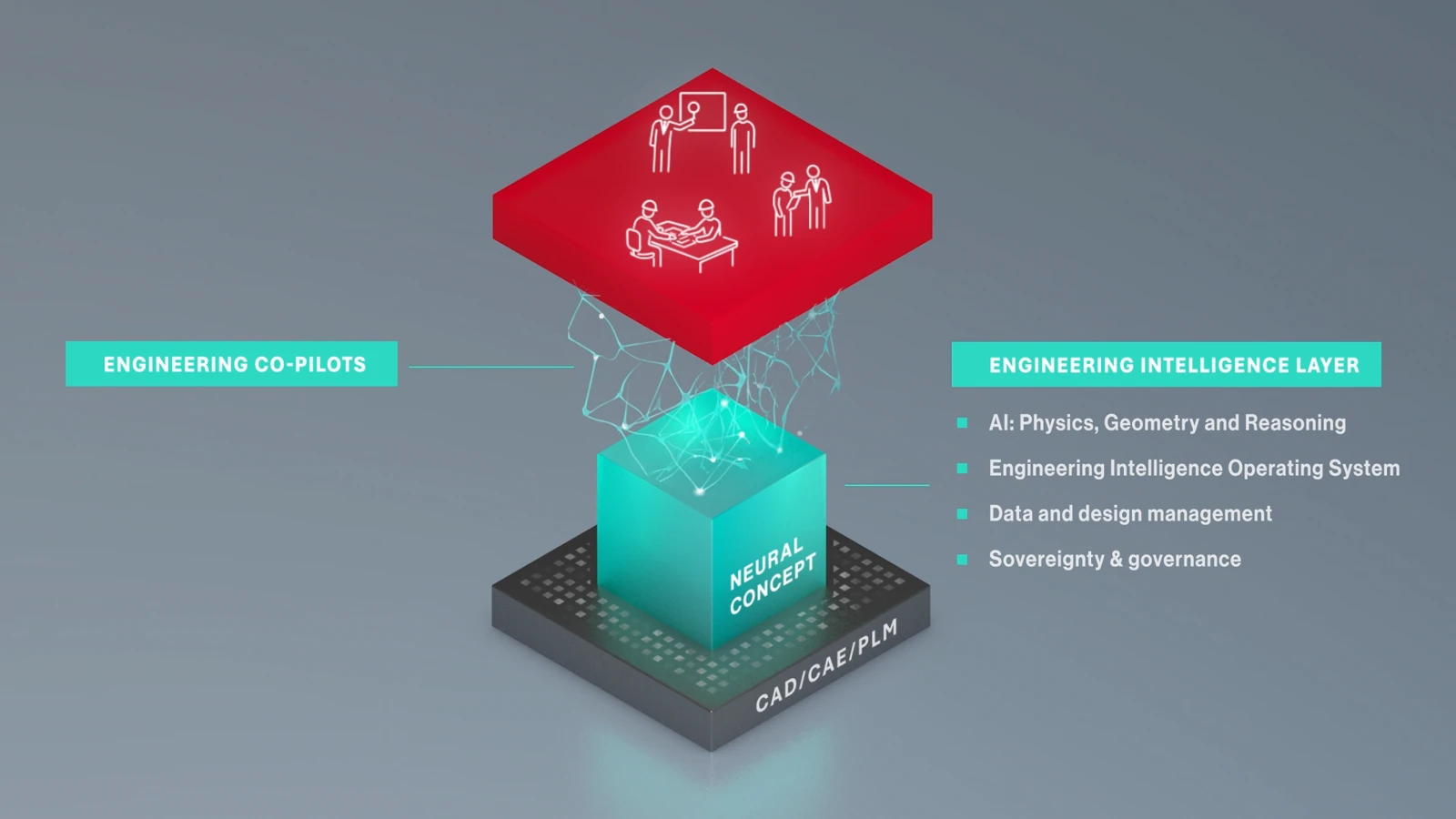
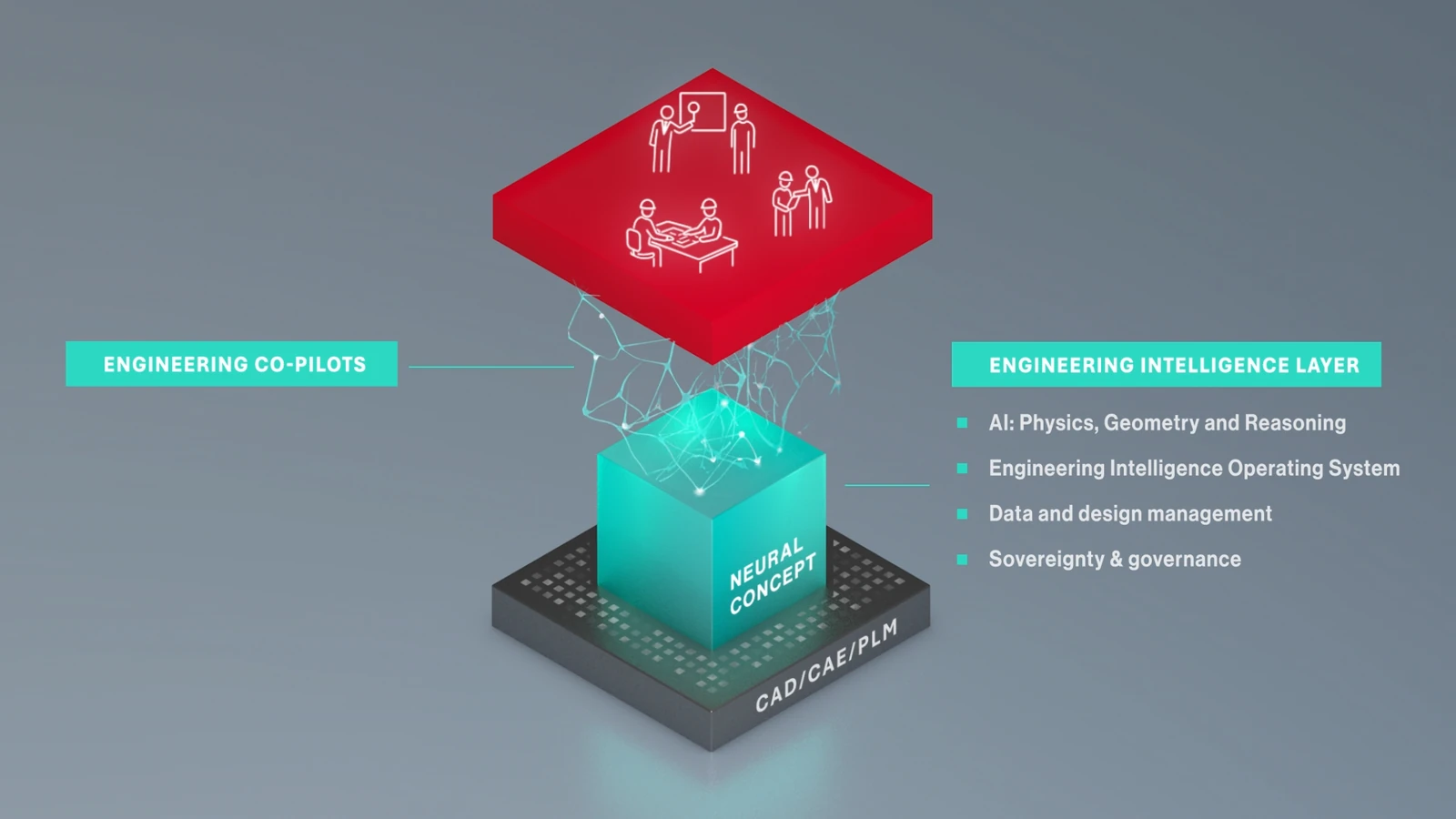
The five tools below each own a slice of the workflow. Neural Concept sits underneath them as the Engineering Intelligence layer: geometric deep learning trained on your own CFD and FEA results, predicting 3D physics performance directly from geometry in seconds, so simulation runs as a continuous signal during design instead of a gate at the end of the cycle.
The company was spun out of EPFL. Its platform applies graph neural networks directly to the CAD surface mesh, which preserves the geometry engineers actually work with instead of reducing it to a handful of scalar parameters. The model learns from an organization’s own validated simulation results, so the physics it reproduces is the physics that the company already trusts.
The method is solver-agnostic. The network learns the relationship between geometry and result from whatever simulation produced the training data, so the same platform covers structural stress, crash, casting and injection molding, CFD, thermal, electromagnetics, and aeroacoustics. Nothing in the approach is tied to one physics or one solver vendor.
Input geometry does not have to be parameterized. The network reads raw surface meshes and CAD files, including STL, so shapes that were never built on a clean parametric tree are usable as-is. This removes the step where an engineer reduces a design to a handful of variables, and with it the ceiling that only shapes expressible in those variables can be predicted.
After training on high-fidelity simulation variants, the model returns field outputs such as pressure and velocity distributions for a new geometry in seconds or fractions of a second. Engineers compare trade-offs while they iterate and commit GPU hours only to the candidates worth fully resolving.
Once trained, the model runs as a web app or a CAD plugin. Designers and junior engineers query physics-aware predictions without owning the solver setup, which puts performance feedback at the point where geometry decisions are actually made. Neural Concept describes this domain-specific assistant as an Engineering AI Copilot, built on a hybrid of AI and physics-based simulation.
Two published references show the pattern in production. Orbital Stack (RWDI Ventures) cut urban wind-comfort iteration from 10 hours to 2 minutes at a tenth of the cost per iteration, detailed in the case study below. Antolin has publicly reported moving physics-aware AI workflows from pilot to production across its last two model cycles.
Recommended for:
Engineering organizations where the number of design variants tested is capped by solver time, whichever physics dominates the program.
Companies holding an archive of validated simulation results that currently sits unused after the program that produced it closes.
Programs that need physics feedback available to designers and junior engineers, not only to the simulation specialists who own the solver licenses.
OEMs and tier 1 suppliers are asked to demonstrate a working AI capability when new programs are awarded.
Neural Concept Limitations:
The platform learns from engineering data, so a training set has to be in place. Most engineering organizations already hold one in the form of past CFD and FEA runs. Workaround – solution: Where the archive is thin, the set is generated with the solver already in use, sourced from a simulation partner, or a pre-trained model is fine-tuned on a smaller sample.
The work starts from a defined engineering objective. Drag, pressure drop, peak stress, mass, and cooling performance are all valid targets, and the objective determines what the model is trained to predict. Open-ended exploration with no stated target is worth framing before deployment begins. Return scales with how often a class of problem recurs: a design problem revisited across a product family or a program repays training quickly. A single study that will never be repeated is still better served by one direct solver run. Workaround – solution: The objective is usually already written into the program’s performance targets, so framing it takes a workshop rather than a project. The reference case is then chosen with engineering management: the problem that returns in every program, where one trained model serves the next vehicle, pump, or heat exchanger in the family.
Bottom line: Neural Concept is the layer to add when the number of geometries you can test is limited by solver cost rather than by CAD authoring or review effort.
2. Leo AI: CAD-aware knowledge and part search
Leo runs on a proprietary Large Mechanical Model (LMM) that treats machine parts as tokens and composes them into DFMA-compliant assemblies (i.e., designs that favor reduced part count, standardized components, and assembly-friendly geometry), much like an LLM composes words ⁽¹⁾. That also makes it useful for mechanical engineering teams evaluating part reuse and assembly decisions early in development.
The Leo AI model ingests multimodal input (text, sketches, 2D images, 3D CAD) and processes native B-rep geometry directly, preserving the topology and parametric history that mesh exports and screenshots discard ⁽²⁾. It can also surface archived constraints from documents like spec sheets instead of forcing engineers to search through old project material.
Leo excels at showing the math behind its answers. When verifying safety factors or calculating pressure drops, Leo runs calculations and displays each step in cited, readable Python code, allowing engineers to check the logic before trusting the result. The code serves as a record of the derivation. Engineers read it like a spreadsheet formula, without needing to write or run code.
Recommended for:
Mechanical engineering teams evaluating part reuse and assembly decisions early in development, where DFMA constraints on part count and standardization are set.
Engineers verifying safety factors or pressure drops who need to read the derivation, in cited Python, before they act on the number.
Companies whose archived constraints sit in spec sheets and old project material rather than in a searchable system.
Leo AI Limitations:
Leo does not replace high-fidelity finite element analysis (FEA) or computational fluid dynamics (CFD). Advanced analyses are not addressed. Workaround – solution: Leo covers retrieval and reuse, and the physics question is routed to the solver stack already in place or to a prediction layer (such as Neural Concept) which returns performance for the candidate part Leo surfaced. Leo shows its derivation in Python. Thus, the values it produces can be audited before they enter that handoff.
Bottom line: Leo suits engineers who need archived design intent and reusable parts surfaced from native CAD, with a Python trace they can check before acting on the answer.
3. Autodesk Fusion: cloud generative design
Autodesk’s generative design inside Fusion began after the 2014 acquisition of Within. Project Dreamcatcher research merged into the product in 2018 ⁽³⁾.
The engine is a classical topology optimization that parallelizes across cloud HPC nodes ⁽⁴⁾. Check here for a guide to topology optimization.
The engineer specifies load cases, geometry, manufacturing methods, and material. Autodesk’s cloud works in parallel across methods, returning a spread of viable designs that each strike a different balance between weight, stiffness, and ease of manufacturing.
It can also generate new geometry directly from those constraints rather than only refining an existing model.
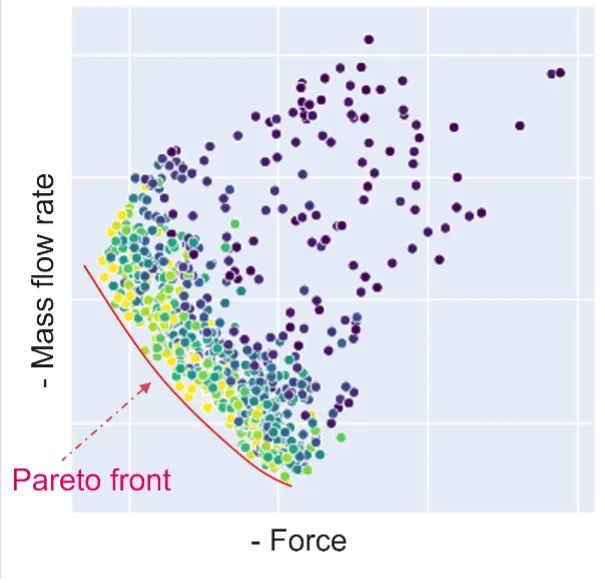
In optimization terms, this is called a Pareto front. On the Pareto front, each design is the best available for some particular set of priorities, and the engineer picks the one whose trade-offs fit the project.
Autodesk has reported generative design outcomes with parts up to 40% lighter and 20% stronger.
The deep learning component operates alongside the topology solver rather than inside its loop. The main value is topology optimization. Currently, machine learning is more prominent in computer-aided manufacturing (CAM), supporting toolpath suggestions and feature recognition.
Recommended for:
Design teams exploring topology from an initial concept, including teams focused on rapid prototyping and early concept iteration
Note: particularly for additively manufactured or 5-axis milled components, where freeform, optimization-derived geometry is actually producible.
Note: Fusion’s cloud compute lowers the cost of entry for topology optimization. It puts the capability that previously required dedicated workstations and specialist solver licenses within reach of smaller engineering teams.
Autodesk Fusion Limitations:
The system’s dependence on cloud services restricts offline functionality. Workaround – solution: Fusion runs in an offline mode on designs cached locally in advance, and saved changes are queued and synchronized when the connection returns, with a reconnection required roughly every two weeks to validate the license. Cloud jobs such as generative design runs are submitted in batches when bandwidth allows. Sites under strict data-egress rules generally keep that work in an on-premise CAE tool.
Several features necessitate additional subscription tiers. Workaround – solution: Autodesk sells extension access through Flex tokens, a prepaid currency that unlocks an extension for 24 hours or pays for a single cloud result. Engineers who run a generative or simulation study a few times a quarter draw on the token pool, and only the heavy users need a full annual extension subscription.
The system-generated output geometry often requires manual refinement before it is suitable for manufacturing. Workaround – solution: Set the manufacturing method inside the study. Fusion generates against additive, 3-axis, and 5-axis milling, and die casting constraints, which narrows the results to shapes the chosen process can produce. The surviving candidate is then rebuilt as a clean parametric solid, and treating the generated shape as a load-path proposal keeps that step short.
Bottom line: Fusion earns its place when the concept is still open and the part will be additively manufactured or 5-axis milled, where optimization-derived geometry is producible.
4. ANSYS Discovery: real-time simulation and physics AI
Discovery launched in 2017 as ANSYS’s interactive simulation product; the original Discovery Live engine used a proprietary GPU-accelerated solver ⁽⁵⁾.
Discovery has since absorbed AI capabilities from ANSYS SimAI, which was released in 2024 as a separate cloud product and has been progressively integrated into the broader Workbench stack.
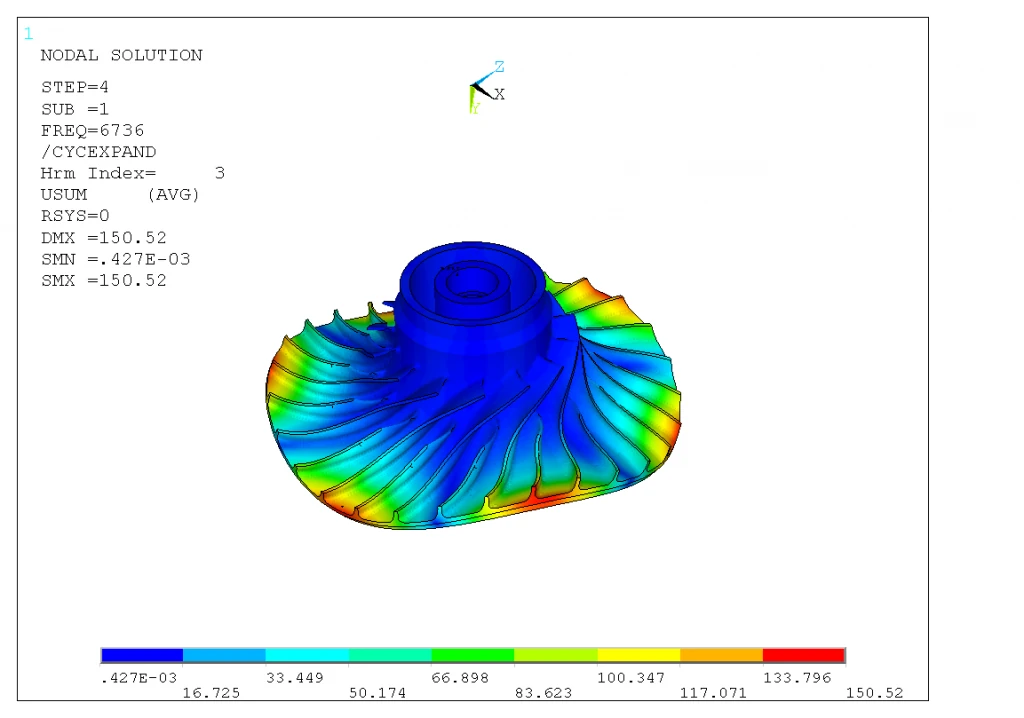
SimAI is the most technically advanced layer, serving as a “physics-neutral” deep-learning surrogate trained on simulation results. According to ANSYS, SimAI processes complex simulation data and uses generative AI to deliver rapid predictions for physics-driven workloads.
ANSYS integrated NVIDIA Omniverse technology into its simulation products. Initially, ANSYS targeted autonomy and computational fluid dynamics. This integration streamlines data preparation and grants access to the Omniverse ecosystem. It enables engineers to refine geometry early and prioritize directional insights over precise numerical accuracy. The traditional workflow of design, meshing, and overnight simulation is reduced to seconds.
Early geometry iteration, where a directional answer in seconds is worth more than a fully resolved one, and the design-mesh-simulate cycle would otherwise run overnight.
Engineering organizations already inside the ANSYS Workbench stack, where SimAI predictions and Omniverse data preparation reach the workflow through Discovery.
ANSYS Discovery Limitations:
Surrogate model predictions deteriorate outside the training distribution. For example, a surrogate trained on subsonic flow may yield inaccurate results in transonic regimes. Workaround – solution: Confirm borderline cases with a full Fluent or Mechanical solve, and extend the training set with runs that cover the new regime before relying on predictions there. Where design work routinely crosses regimes, the training set is sized up front against the design space the program will actually cover, rather than against a single study. This is the approach documented by Neural Concept. The design space to be explored is the main factor determining how many simulations a model needs.
Discovery requires a capable local GPU or access to cloud computing resources, incurring significant hardware costs. Workaround – solution: GPU capacity is rented per session instead of purchased. Ansys Cloud and Ansys Access on Microsoft Azure run Discovery on GPU-enabled virtual workstations, with fractional GPU allocation so the instance is sized to the job. One shared workstation serves a group of engineers when interactive sessions are scheduled.
Source: blog.ansys.net (CC BY 3.0 US)
Bottom line: Discovery fits early geometry iteration that stays inside the training distribution, on hardware that can carry a GPU solver.
5. Siemens NX + Teamcenter: enterprise PLM and complex engineering
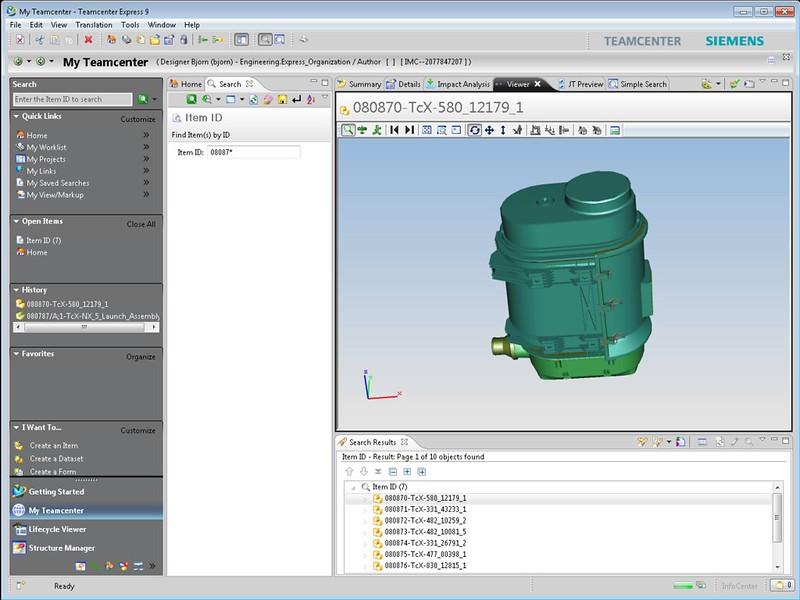
Teamcenter and NX are the PLM and CAD software pillars of Siemens Digital Industries Software, the result of Siemens’s 2007 acquisition of UGS and its subsequent consolidation into the Xcelerator portfolio, launched in 2019.
Industrial AI is the unifying thread across the portfolio. It spans machine-learning-assisted authoring in NX, AI features being added to Teamcenter for product data navigation and part retrieval, and an expanding NVIDIA partnership for visualization and digital-twin work that Siemens and NVIDIA now describe as the Industrial AI Operating System.
NX Command Prediction uses machine learning to track user interaction logs and present the most likely next commands on a contextual panel. Its AI capabilities are distributed throughout the workflow rather than concentrated in a single chat surface, unlike single-product entrants such as Leo or CoLab.
Teamcenter is layering machine learning onto traditional BOM and change-management workflows. Recent additions include:
AI-Assisted Part Finder, which retrieves geometrically similar existing parts from an image input.
Teamcenter Copilot, announced at CES 2026 for natural-language product data navigation. The underlying change-impact analysis and BOM replacement remain rule-based at their core, with ML acting as a retrieval and interface layer on top ⁽⁶⁾.
Siemens characterizes its broader Industrial Copilot, launched in 2024 in partnership with Microsoft, as the first generative AI assistant for engineering in industrial environments. The original Copilot focused on automation engineering.
The Design Copilot for NX is a separate member of the same family, focused on the CAD authoring workflow, with natural-language design queries and accelerated authoring as the headline use cases.
Recommended for:
Enterprise programs already running NX, Teamcenter, and the wider Xcelerator portfolio, where AI reaches authoring, BOM navigation, and part retrieval instead of one chat surface.
Engineering organizations whose Teamcenter metadata is consistent enough for AI-Assisted Part Finder and Teamcenter Copilot to return usable results.
Siemens NX + Teamcenter Limitations:
Integration timelines for full NX, Teamcenter, and Xcelerator deployments typically run several quarters at a minimum and often span multiple years for large, multi-site rollouts. Workaround – solution: Phase the rollout and start on Teamcenter X, the SaaS deployment Siemens operates, which arrives preconfigured and takes the server build off the critical path. One site or one product line goes live while the wider program continues. The first results arrive in the order of weeks rather than at the end of the integration.
Total cost of ownership across NX, Teamcenter, and the broader Xcelerator stack is well above that of mid-market alternatives, both in license fees and in the consulting and integration work required to deploy the system properly. Workaround – solution: Assign licenses by role. Full NX authoring goes to the design core, while lighter Teamcenter roles cover the engineers, buyers, and suppliers who only read and comment on data. Subscription and SaaS terms replace perpetual licenses with a cost that scales with headcount. Scoping the first phase to one product line keeps consulting spend proportional to the value already proven.
The AI capabilities depend on clean upstream PLM data. Organizations whose Teamcenter instance is heavily customized or whose historical metadata is inconsistent will see weaker results until that foundation is addressed. Workaround – solution: Scope the clean-up to the part families that are actually retrieved, usually a small fraction of the archive, and enforce classification rules at check-in so new data stops reintroducing the problem. The AI features improve as each family is normalized. Value returns progressively instead of after one long project.
Source: Siemens PLM Software (CC BY-ND 2.0)
Bottom line: NX with Teamcenter suits enterprise programs that already run on Xcelerator and can absorb a multi-quarter integration and the PLM data clean-up it depends on.
6. CoLab: automated design review and cross-CAD knowledge
CoLab Software ⁽⁷⁾ announced a multimillion-dollar AI contract with Bombardier in 2025, joining an existing aerospace and industrial customer base.
The original product was a multi-CAD viewer for asynchronous design review, supporting more than 30 native and neutral CAD file types directly in the browser, without requiring a STEP export or a “pack and go” step ⁽⁸⁾.
Eight years of accumulated design review activity form the basis of CoLab’s competitive position: a structured record of the comments, markups, and rationale that engineers attach to specific 2D drawings and 3D models throughout a program’s lifecycle ⁽⁹⁾.
CoLab’s AI capabilities under the ReviewAI brand include two agents.
AutoReview checks 2D and 3D files against DFM rules using retrieval-augmented generation, supporting quality control through checks against review standards.
The Lessons Learned Agent finds insights from past reviews, automating manual postmortems.
Both agents are supported by an engineering knowledge layer linking geometric entities to related comments, standards, and sign-off rationale.
With extensive review data and a Fortune 500 customer base, CoLab is well-positioned, especially for teams facing challenges in multi-CAD collaboration and knowledge capture.
Recommended for:
Cross-functional teams reviewing designs across multiple CAD platforms and supplier networks, especially where loss of institutional knowledge is costly.
Aerospace and defense OEMs are the cleanest fit: program lifecycles span decades, supplier networks are large, and decades of design judgment can walk out the door when a senior engineer retires.
CoLab Limitations:
AutoReview’s usefulness scales with the volume and quality of historical review data. Teams new to CoLab may need several quarters of structured review activity inside the platform before the agent has enough context to produce strong recommendations (per CoLab’s own onboarding guidance). Workaround – solution: AutoReview runs a set of common checks out of the box on the first model or drawing uploaded. Thus, "day-one" value does not depend on review history. The company’s own standards, guidelines, and checklists are uploaded in whatever format they already exist in (PDF, spreadsheet, or a shared folder). This supplies explicit rules while the review history accumulates.
Automated flagging continues to face calibration challenges familiar to any rule-based or RAG-driven checker. False positives remain a tuning challenge during the early stages of training the system to a specific organization’s standards. Workaround – solution: Scope each analysis to the checklist items that matter at that point in development, dimensions and tolerances at drawing release, for example, which cuts the volume of feedback and raises its precision. Each annotation cites the standard it came from. Thus, a reviewer dismisses a flag against the source rather than by opinion. That record narrows the checks over subsequent reviews.
Bottom line: CoLab pays back where design review volume is high and institutional knowledge is at risk, once several quarters of structured review data sit inside the platform.
Takeaway: Which tool is best for you?
Tool
Workflow position
AI approach
Best for
Neural Concept
Engineering Intelligence layer
Geometric deep learning (GNNs) on the CAD mesh, trained on your own CFD/FEA; predicts 3D physics from geometry in seconds
Compressing the design→explore→simulate loop; reserving solver hours for the final candidate
Leo AI
Knowledge retrieval and part reuse
Large Mechanical Model on native B-rep geometry; Python validation layer; RAG over 1M+ engineering sources
Recovering institutional knowledge from legacy CAD vaults and accelerating part reuse
Autodesk Fusion
Generative design from a blank page
SIMP and level-set topology optimization on cloud HPC; diffusion-based shape models in research
Concept exploration from a blank brief, especially for additive or 5-axis milled parts
ANSYS Discovery
Real-time simulation feedback
GPU solver for instant approximations; SimAI surrogates (GNNs on FEM meshes, 3D CNNs on voxelized geometry); PINN tooling via NVIDIA Modulus
Fast directional simulation feedback during early geometry iteration
Siemens NX + Teamcenter
Enterprise PLM and complex engineering
Distributed ML across the Xcelerator stack: Command Prediction in NX, retrieval and copilots over BOM and change-management; LLM Industrial Copilots for documentation
Enterprise-scale programs with strict regulatory traceability (aerospace, defense)
CoLab
Automated design review and DFM
Knowledge layer linking geometric and textual entities; similarity engine over geometric and semantic embeddings; LLM AutoReview via RAG on customer standards
Cross-CAD design reviews with automated DFM checks and lessons-learned capture
Turn your simulation archive into a real-time design signal.
Why engineering organizations are investing in AI in 2026
Three pressures justify AI investment in engineering organizations in 2026:
Compressed program timelines; automotive moved from 48-60 months down to 18-24 months.
The cost of high-fidelity CFD and FEA simulations.
Engineering data and past lessons learned are buried in project archives.
Shorter programs. Vehicle programs that once took 48-60 months now aim for 18-24 months, and aerospace and industrial equipment face similar pressure, as electrification rewrites product architectures. Engineering headcount has not grown to match. Therefore, the same teams run more programs in less time. Routine design iteration is the obvious place to save hours.
Expensive simulations. A single high-fidelity CFD or FEA run can occupy a GPU cluster for a full day. That caps the number of geometry variants a team actually tests. Physics-aware models produce quick predictions and let engineers run hundreds of variants they could not afford to run before.
Buried archives. Old project files hold what teams have already learned, including the mistakes that cost money the first time. Current search tools cannot retrieve this. Better retrieval makes the archive useful for the next program.
Engineering AI is already in production at some Tier 1 suppliers. Antolin has publicly reported that its AI-driven interior design work with Neural Concept moved physics-aware AI workflows from pilot to production over the last two model cycles. The Antolin benchmark is what OEMs expect when awarding new programs.
Selection criteria for AI systems and AI models in 2026
Integration depth is the strongest predictor of return on investment in engineering AI deployment because tools outside the CAD and PLM environment force engineers into export-upload-import cycles that erode time on task within a quarter. A serviceable engineering AI tool reads native CAD formats (B-rep for parametric history, mesh for solver outputs) and connects to existing vault systems (Teamcenter, Windchill, or 3DEXPERIENCE).
Validation capability is the second criterion. A system that produces engineering claims must have an auditable output. Signs include citing primary sources and providing executable Python code. Physics-informed surrogates need scrutiny: training distribution should be documented, and predictions should include explicit uncertainty quantification.
Vendor maturity, ability to scale beyond the pilot phase, and pricing transparency complete the practical filters.
Engineering Intelligence: where engineering AI differs from productivity AI
Engineering Intelligence is the application of machine learning, including graph neural networks and physics-informed surrogates, to the engineering substrate of CAD geometry and simulation outputs. It differs from generic productivity AI in three ways: the input is geometry rather than text, the output is a physics prediction or an engineering decision rather than a paragraph, and validation is auditable against established computer-aided engineering (CAE) simulation ground truth.
What this means in practice:
EPFL spin-out, geometric deep learning foundation. Spun out of EPFL, the platform uses geometric deep learning (graph neural networks operating directly on the CAD surface mesh) trained on prior CFD and FEA results to predict 3D physics performance for new geometries in seconds.
In production at OEMs and suppliers. Engineering teams at automotive OEMs, aerospace primes, and tier 1/2 suppliers use it to compress the design-explore-simulate loop from days to minutes, surfacing physics-aware decisions before any heavy solver runs.
Democratization beyond the simulation team. Once trained, the model runs as a web app or CAD plugin, so designers and junior engineers can query physics-aware predictions in seconds without owning the solver setup.
Simulation as a continuous signal. Simulation stops being gated at the end of the design cycle and becomes a continuous signal. Engineers iterate on geometry with predicted performance visible in real time, then commit GPU hours only to candidates worth fully resolving.
Running on high-quality engineering data. After training on diverse high-fidelity simulation variants, the Neural Concept platform predicts outcomes such as pressure and velocity fields, processing new geometries in seconds or fractions of a second rather than hours.
Predictions inside the modeling environment. Designers see projected outcomes update in real time within their environment, instead of exporting files and waiting overnight. Teams compare trade-offs as they iterate and reserve high-fidelity simulation for candidates worth fully resolving, freeing engineers to spend more time on creative problem-solving.
Engineering AI Copilot framing. Neural Concept introduced the term ‘Engineering AI Copilot’ to describe a domain-specific assistant built on a hybrid AI-physics-based simulation, so engineers can get physics-aware predictions within their design workflow. Generative exploration and team collaboration sit atop that simulation core, connecting automated optimization with the engineer’s domain expertise and human creativity. More on the evolution of jobs for mechanical engineers.
In the future, the prediction will sit next to the drawn geometry, and the solver will be reserved for the final candidate to commit to.
Case study: cutting CFD iteration time from 10 hours to 2 minutes
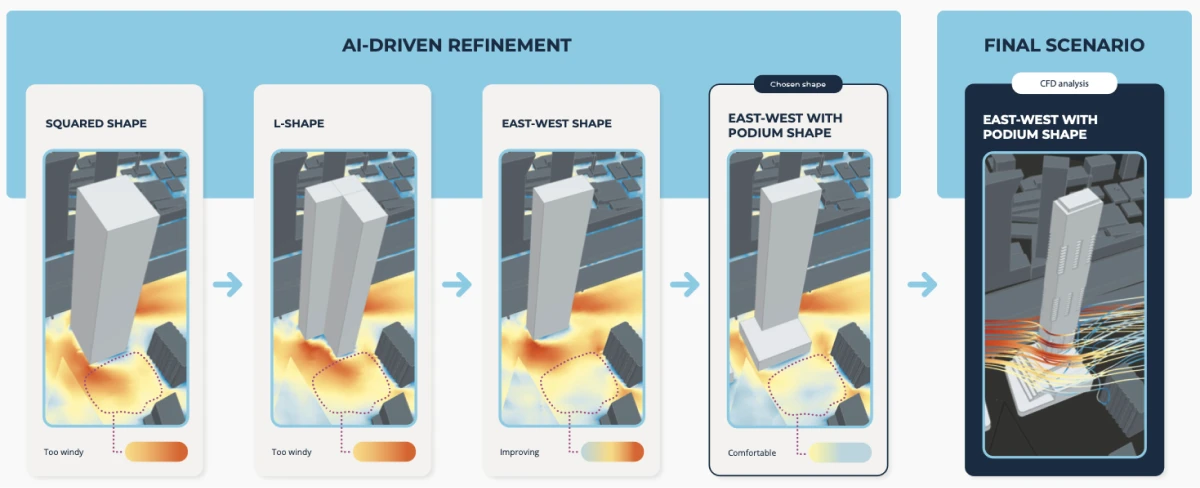
10 hours → 2 minutes (≈300× faster), with cost per iteration cut 10-fold. Orbital Stack (RWDI Ventures) integrated Neural Concept’s deep-learning model into its urban wind-comfort CFD workflow — predictions now run inside the design loop, and full CFD is reserved for final validation.
Orbital Stack, the wind-engineering CFD platform built by RWDI Ventures, reduced its design-iteration time for urban wind-comfort analysis from 10 hours to 2 minutes after integrating Neural Concept’s deep-learning model into its product. The cost per iteration was reduced 10-fold.
The case demonstrates Engineering Intelligence in production for a CFD workload previously gated by overnight solver runs.
The original CFD bottleneck. Designing buildings for cities requires CFD analysis of pedestrian-level wind, sunlight exposure, and microclimate effects. Traditional CFD and wind-tunnel testing are slow and expensive, which makes wind analysis impractical for early-stage design exploration and unaffordable for smaller projects.
What changed with the AI integration? Neural Concept used the RWDI dataset to train a deep-learning model that reproduces CFD results within seconds for user-supplied city geometry. The model runs directly inside the Orbital Stack web app, so designers see wind-comfort predictions as part of the design loop rather than as an end-of-cycle deliverable.
Workflow position: AI predictions in early design; traditional CFD or wind-tunnel testing reserved for final validation and regulatory submissions
The Orbital Stack benchmark is a result of the Engineering Intelligence framing. A model trained on validated CFD data lets designers iterate at the speed of geometry edits, with the solver reserved for the candidate worth committing to.
See physics-aware prediction inside your design loop.
Quick comparator map: Engineering Intelligence vs. ROMs, CAE, and AI-driven tools
The following table maps the Engineering Intelligence approach against ROMs, traditional CAE, and the five AI tools reviewed above.
Each row notes what the comparator provides, how the Neural Concept platform differs in technical terms, and whether the relationship is direct or complementary.
Comparator
What it provides
Neural Concept’s distinction
Classical ROMs (POD-Galerkin, reduced basis)
Fast predictions in a fixed parametric space; provable error bounds available
Works on raw 3D geometry; captures topology and shape variation
Traditional CAE
Full-fidelity solutions, ground truth for training, required for certification
Inference from a learned function; no PDE solver
Leo AI
CAD knowledge retrieval; Python validation of part choices
Predicts physics performance from geometry
Autodesk Fusion
Topology optimization (SIMP, level-set) scored by CAE per candidate
Can act as the evaluator inside the generative loop
ANSYS Discovery + SimAI
Deep learning surrogate inside the ANSYS ecosystem, trained on ANSYS data
Solver-agnostic; geometric deep learning directly on the mesh
Siemens NX + Teamcenter
CAD assistance (Command Prediction); PLM-side BOM and documentation intelligence
The physics layer that PLM-driven design changes can query
CoLab
Automated design review against standards and historical lessons
Performance prediction against engineering targets
References (research papers and vendor publications)
[1] Begg, R. (November 21, 2025). Leo AI: How CAD-Aware AI is Changing Mechanical Design and Engineering Workflows. Machine Design. machinedesign.com
[2] Joseph G. Lambourne et al. (Apr 2021). BRepNet: A topological message passing system for solid models. arxiv.org/abs/2104.00706
[3] Digital Engineering (September 2, 2015). Autodesk Research Project Dreamcatcher: Pushing the Limits of Generative Design. digitalengineering247.com
[4] Herrero-Pérez, D., Picó-Vicente, S. G., Martínez-Barberá, H. (2024). Adaptive density-based robust topology optimization under uncertain loads using parallel computing. Engineering with Computers, 40, 21-43. doi.org/10.1007/s00366-023-01823-w
[9] Khan, M. T., Chen, L., Feng, W., & Moon, S. K. (2026). Context-Aware Mapping of 2D Drawing Annotations to 3D CAD Features Using LLM-Assisted Reasoning for Manufacturing Automation. arXiv preprint arXiv:2602.18296. doi.org/10.48550/arXiv.2602.18296
FAQ
What are the main applications of AI in mechanical engineering?
The main applications in 2026 are generative design, simulation acceleration, and automated design validation. These span the entire product lifecycle, from early-stage concept generation through design review and predictive maintenance, moving engineering work away from manual drafting and slow solver runs toward real-time physics prediction.
How has the role of AI in mechanical engineering shifted by 2026?
As of 2026, AI applications in mechanical engineering have transitioned from passive analysis tools to active, agentic “copilots” that understand CAD geometry, engineering standards, and physics principles. These “copilot” applications automate administrative and knowledge-based tasks that often bottleneck mechanical engineering projects.
How much faster does AI deliver FEA and CFD simulation results?
As of 2026, AI-driven solvers provide results for traditional Finite Element Analysis (FEA) and Computational Fluid Dynamics (CFD) 10–100 times faster. AI applications in mechanical engineering can predict 3D physics performance in seconds, regardless of the original solver used.
What is generative design, and what kinds of geometry can it produce?
Generative design tools use algorithms to explore thousands of candidate solutions within a design space defined by user-defined design constraints. The engineer sets the layout constraints such as functional requirements and material properties, along with load case and manufacturing methods, and the tools return optimized alternatives, shifting the engineer from idea generator to curator of options. The output geometries are often organic and lattice-like, pushing the boundaries of manufacturability and prompting new engineering solutions.
How do AI tools automate CAD modeling and design review?
AI tools help with automating repetitive tasks such as dimensioning and applying constraints, and they handle the administrative side of design reviews. By checking models against design standards and keeping feedback from scattering across communications and documents, they reduce errors and free engineers for complex problem-solving.
How does AI help engineers reuse past design knowledge?
AI-powered tools can actively structure historical data, read past drawings, and automatically surface lessons learned, preventing engineers from having to start designs from scratch.
How is AI changing PLM systems and the digital thread?
AI transforms Product Lifecycle Management (PLM) from a passive digital filing cabinet into an active, agentic partner that automates workflows and extracts actionable insights from complex lifecycle data. By embedding AI directly into PLM systems, organizations can eliminate data silos and automate change management, allowing engineers to focus on design rather than data retrieval. AI agents can navigate the digital thread of PLM systems, answering natural-language questions and automating administrative workflows, thereby enhancing efficiency in engineering processes.
How does artificial intelligence improve the mechanical engineering design process?
AI improves the design process by replacing manual iteration with AI-assisted iterations that reflect accumulated domain knowledge and company standards. Platforms like Neural Concept, Leo AI, and ANSYS SimAI produce accurate answers on pressure drops, stress concentrations, or part reuse in seconds rather than the hours traditional solvers and search routines require, allowing teams to converge on solutions that align with best practices and reduce mistakes before manufacturing. Intelligent automation reclaims valuable time lost to routine geometry adjustments and redirects it toward judgment calls on material selection and real-world performance trade-offs, with consistent time savings on every cycle. In practice, in 2026 AI-driven tools can save engineers 5-7 hours per week.
How do AI tools integrate with existing CAD environments and the broader manufacturing process?
A well-implemented AI tool reads existing CAD formats directly, integrates with version control via PLM data connectors, and remains within the engineer’s normal toolchain to keep the learning curve flat. CoLab is a great example: it connects to existing CAD assets across multiple tools (SolidWorks, NX, and CATIA among them), pulls structured PLM data into review threads, and applies large language models to document reviews, so engineers no longer have to manually dig through legacy folders. This kind of integration reduces time-consuming tasks such as change tracking, comparison, and DFM verification, and reduces human error by enforcing rules consistently throughout the manufacturing process. Generative design and AI image generation extend the workflow into ideation, with image generation models producing rapid-prototyping renders from text or sketch inputs. At the same time, code completion in engineering scripting environments handles boilerplate for solvers.